A collection of projects I’ve worked on

These are some of the projects I’ve designed and collaborated on, reflecting my approach to product, design, and teamwork.

background for thumbnails in case studies
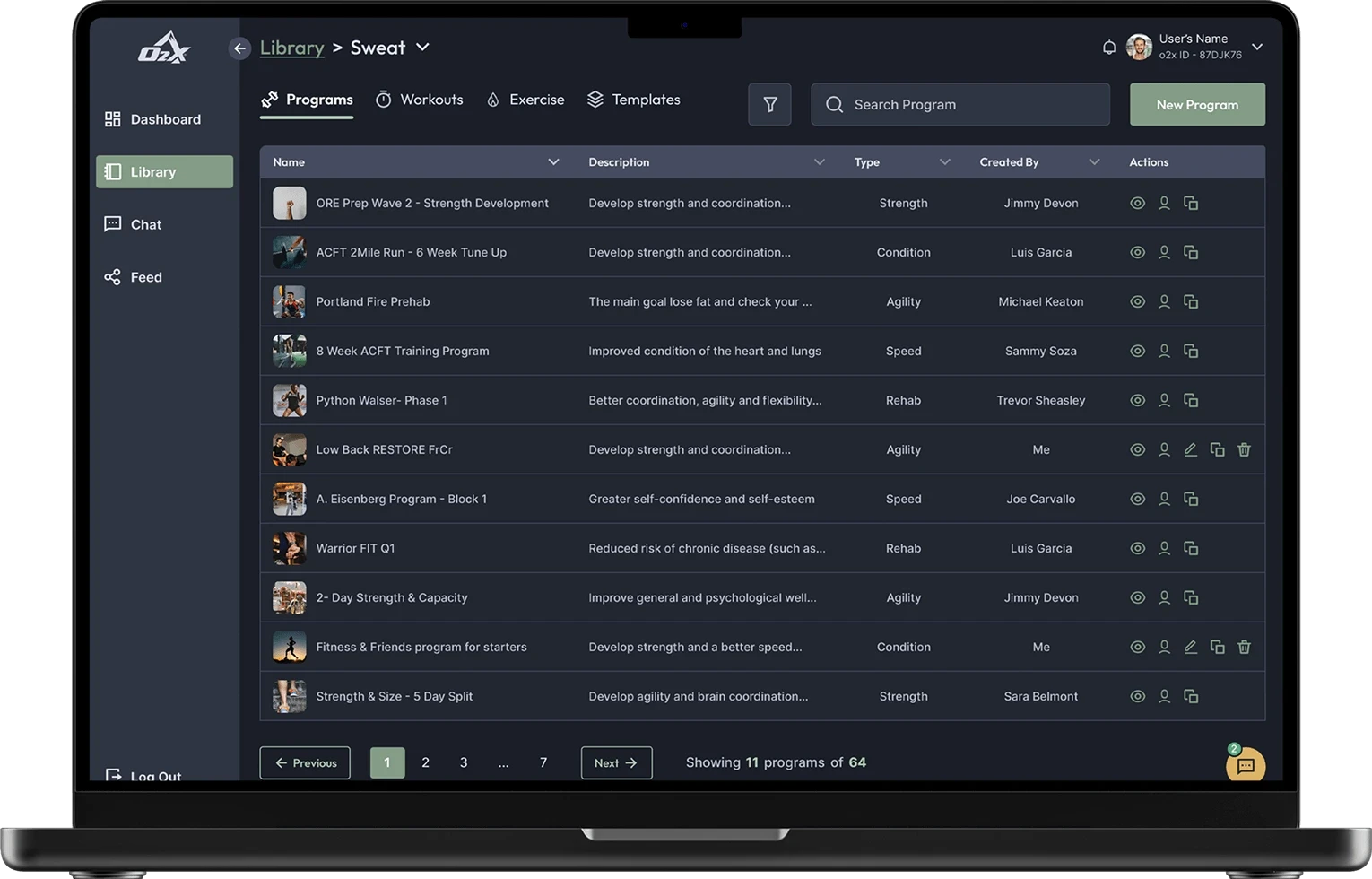
Screen of O2X web app library

O2X Web App

Helping coaches to create programs 52% faster and be aware of the athletes

Research

UI Design

Prototyping

User Testing

Background for case studies thumbnails

Educate Prospects with

Knowledge-Led Growth

A discovery hub showcases your thought leadership content driving knowledge-led growth.

SIGNUP FOR FREE ACCESS

Home

Discover

SIGN IN

TALK TO AN EXPERT

UX Audit for Landing page and Web Platform

Revinova UX Audit: Improving User Flows and Conversion

Research

Heuristics

User Testing

Visual Design

Background for case studies thumbnails

Typography

Typography can help create clear hierarchies, organize information, and guide users through a product or experience.

Nunito Sans

Ag

ABCDEFGHIJKLMNOPQRSTUVWXYZ
abcdefghijklmnopqrstuvwxyz
0123456789 !@#$%^&*()

Use it for display, headings, tabs, etc

Fonts in gray are not used in this project

Inter

Ag

ABCDEFGHIJKLMNOPQRSTUVWXYZ
abcdefghijklmnopqrstuvwxyz
0123456789 !@#$%^&*()

Use it for buttons, body text, cards, alerts etc.

Fonts in gray are not used in this project

Display (Page Titles)

Font size: 32px / 2rem | Line height: 40px / 2.5rem

Display

Light

Display

Regular

Display

Semibold

Display

Bold

H1 (Page Titles)

Font size: 32px / 2rem | Line height: 40px / 2.5rem

H1

Light

H1

Regular

H1

Semibold

H1

Bold

H2

Light

H2

Regular

H2

Semibold

H2

Bold

H3

Light

H3

Regular

H3

Semibold

H3

Bold

H4

Light

H4

Regular

H4

Semibold

H4

Bold

H5

Light

H5

Regular

H5

Semibold

H5

Bold

H6

Light

H6

Regular

H6

Semibold

H6

Bold

Paragraph Large

Light

Paragraph Large

Regular

Paragraph Large

Semibold

Paragraph Large

Bold

Paragraph Medium

Light

Paragraph Medium

Regular

Paragraph Medium

Semibold

Paragraph Medium

Bold

Paragraph Small

Light

Paragraph Small

Regular

Paragraph Small

Semibold

Paragraph Small

Bold

X Small

Regular

X Small

Regular

X Small

Semibold

X Small

Bold

Tiny

Regular

Tiny

Regular

Tiny

Semibold

Tiny

Bold

Color

The color palette provides a unified and recognizable consistency to any project. It ensures that all visual elements align harmoniously, enhancing the overall aesthetic and reinforcing brand identity. This cohesive use of color helps create an engaging and professional look throughout your design.

Primary

The primary color palette is used across all the interactive elements such as CTA’s, links, inputs, active states, etc.

AAA 9.21

900

#0F4F58

AA 5.3

800

#167684

AA 5.2

700

#1E9EB1

AAA

600

#07272C

AAA 7.99

500

#25C5DD

AAA 7.85

400

#51D1E4

AAA 9.1

300

#7CDCEB

AAA 10.48

200

#A8E8F1

AAA 12.15

100

#D3F3F8

AAA 13.15

50

#E9F9FC

Secondary Colors

These colors serve to complement the primary color, adding depth and flexibility to the visual identity and can be use on secondary actions, buttons, links, etc.

AAA 6.63

900

#326655

AAA

800

#4C997F

AA

700

#65CCAA

AAA

600

#19332A

AAA 11.61

500

#7EFFD4

AAA 11.97

400

#98FFDD

AAA 12.41

300

#B2FFE5

AAA 12.92

200

#CBFFEE

AAA 13.52

100

#E5FFF6

AAA 13.86

50

#F2FFFB

Neutral

Neutral colors are used to provide balance and subtlety in the design. They are ideal for backgrounds, text, and borders ensuring that primary and secondary colors stand out.

AAA

900

#222C33

AAA

800

#2C353E

AAA

700

#414E5C

AAA

600

#53606D

AA

500

#8291A0

AA 6.43

400

#93A3B4

AAA 8.59

300

#AEBCCB

AAA

200

#CBD7E3

AAA

100

#E5EDF5

AAA

50

#F7FAFD

BLACK & wHITE

White is typically used for text, icons, and other key elements to ensure legibility. Black provides a clean background, creating negative space that enhances readability and highlights primary and secondary colors.

AAA

White

#FFFFFF

AAA

Black

#191F25

Transparent

These colors create overlays that focus user attention while maintaining context. They provide subtle backgrounds that dim underlying content, ensuring the primary modal content stands out.

AAA

Modal

#191F25 75%

GRADIENTS

Use gradients to add depth, dimension, and visual interest to the interface. They can enhance UI elements by creating a more dynamic look. Spinners and sliders use gradients.

Angular

#25C5DD

Linear

#25C5DD

Status colors

Status colors provide visual cues about system states: green for success or positive actions, red for errors or critical issues, yellow for caution or pending actions, and red for error status or messages.

AAA

Success

#42D864

AAA

S. Light

#ECFBF0

AAA

Warning

#EFD75A

AA 4.25

W. Light

#FDFBEF

3.03

Error

#EE645F

AAA 10.35

E. Light

#FDF0EF

Design System

Building a practical design system for client products

UX Strategy

Figma

Design System

UI & Visual Design

Background for case studies thumbnails

Typography

Typography can help create clear hierarchies, organize information, and guide users through a product or experience.

Nunito Sans

Ag

ABCDEFGHIJKLMNOPQRSTUVWXYZ
abcdefghijklmnopqrstuvwxyz
0123456789 !@#$%^&*()

Use it for display, headings, tabs, etc

Fonts in gray are not used in this project

Inter

Ag

ABCDEFGHIJKLMNOPQRSTUVWXYZ
abcdefghijklmnopqrstuvwxyz
0123456789 !@#$%^&*()

Use it for buttons, body text, cards, alerts etc.

Fonts in gray are not used in this project

Display (Page Titles)

Font size: 32px / 2rem | Line height: 40px / 2.5rem

Display

Light

Display

Regular

Display

Semibold

Display

Bold

H1 (Page Titles)

Font size: 32px / 2rem | Line height: 40px / 2.5rem

H1

Light

H1

Regular

H1

Semibold

H1

Bold

H2

Light

H2

Regular

H2

Semibold

H2

Bold

H3

Light

H3

Regular

H3

Semibold

H3

Bold

H4

Light

H4

Regular

H4

Semibold

H4

Bold

H5

Light

H5

Regular

H5

Semibold

H5

Bold

H6

Light

H6

Regular

H6

Semibold

H6

Bold

Paragraph Large

Light

Paragraph Large

Regular

Paragraph Large

Semibold

Paragraph Large

Bold

Paragraph Medium

Light

Paragraph Medium

Regular

Paragraph Medium

Semibold

Paragraph Medium

Bold

Paragraph Small

Light

Paragraph Small

Regular

Paragraph Small

Semibold

Paragraph Small

Bold

X Small

Regular

X Small

Regular

X Small

Semibold

X Small

Bold

Tiny

Regular

Tiny

Regular

Tiny

Semibold

Tiny

Bold

Color

The color palette provides a unified and recognizable consistency to any project. It ensures that all visual elements align harmoniously, enhancing the overall aesthetic and reinforcing brand identity. This cohesive use of color helps create an engaging and professional look throughout your design.

Primary

The primary color palette is used across all the interactive elements such as CTA’s, links, inputs, active states, etc.

AAA 9.21

900

#0F4F58

AA 5.3

800

#167684

AA 5.2

700

#1E9EB1

AAA

600

#07272C

AAA 7.99

500

#25C5DD

AAA 7.85

400

#51D1E4

AAA 9.1

300

#7CDCEB

AAA 10.48

200

#A8E8F1

AAA 12.15

100

#D3F3F8

AAA 13.15

50

#E9F9FC

Secondary Colors

These colors serve to complement the primary color, adding depth and flexibility to the visual identity and can be use on secondary actions, buttons, links, etc.

AAA 6.63

900

#326655

AAA

800

#4C997F

AA

700

#65CCAA

AAA

600

#19332A

AAA 11.61

500

#7EFFD4

AAA 11.97

400

#98FFDD

AAA 12.41

300

#B2FFE5

AAA 12.92

200

#CBFFEE

AAA 13.52

100

#E5FFF6

AAA 13.86

50

#F2FFFB

Neutral

Neutral colors are used to provide balance and subtlety in the design. They are ideal for backgrounds, text, and borders ensuring that primary and secondary colors stand out.

AAA

900

#222C33

AAA

800

#2C353E

AAA

700

#414E5C

AAA

600

#53606D

AA

500

#8291A0

AA 6.43

400

#93A3B4

AAA 8.59

300

#AEBCCB

AAA

200

#CBD7E3

AAA

100

#E5EDF5

AAA

50

#F7FAFD

BLACK & wHITE

White is typically used for text, icons, and other key elements to ensure legibility. Black provides a clean background, creating negative space that enhances readability and highlights primary and secondary colors.

AAA

White

#FFFFFF

AAA

Black

#191F25

Transparent

These colors create overlays that focus user attention while maintaining context. They provide subtle backgrounds that dim underlying content, ensuring the primary modal content stands out.

AAA

Modal

#191F25 75%

GRADIENTS

Use gradients to add depth, dimension, and visual interest to the interface. They can enhance UI elements by creating a more dynamic look. Spinners and sliders use gradients.

Angular

#25C5DD

Linear

#25C5DD

Status colors

Status colors provide visual cues about system states: green for success or positive actions, red for errors or critical issues, yellow for caution or pending actions, and red for error status or messages.

AAA

Success

#42D864

AAA

S. Light

#ECFBF0

AAA

Warning

#EFD75A

AA 4.25

W. Light

#FDFBEF

3.03

Error

#EE645F

AAA 10.35

E. Light

#FDF0EF

Design System

Building a practical design system for client products

UX Strategy

Figma

Design System

UI & Visual Design

Let's build something together

Let's build something together

Whether you’re launching something new or refining an existing product, I can help you design with clarity, purpose, and precision.

Whether you’re launching something new or refining an existing product, I can help you design with clarity, purpose, and precision.